


Lumber Inc
4.4392.00 Reviews
App Specs
- Version
- 0.6.1
- Updated On
- License
- Free
- Downloads
- 1,000,000+
- Developer
- Clingycat Games
- Categories
- Simulation
- Platform
- Android
Screenshots
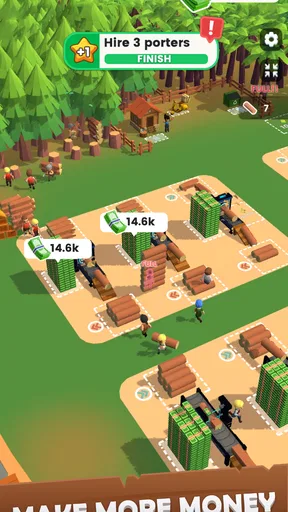

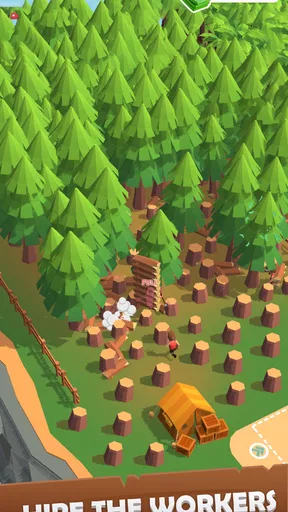



 Analysis by AppCompare
I judge a management game by how much it lets me think between taps, how clearly it shows the consequences of my choices, and whether its routine feels pleasant rather than like another chore. Lumber Inc. has a clear appeal: it turns forestry and sawmill work into a mobile simulation about growing a business. It is free to play, made by Clingycat Games, and its 4.4 average from around 14,000 ratings suggests that plenty of players have found something to enjoy. I would approach it as a relaxed, incremental management game, not a detailed industrial simulator.
Who will enjoy the lumberyard routine
The central attraction is watching a modest operation develop into a larger production setup. You begin with a small forest and a basic mill, then work through decisions about workers, equipment and output. That gives each improvement a visible purpose: a faster or better-equipped operation can help you keep up with demand and earn room to expand. The satisfying part is not simply seeing trees fall; it is connecting the steps from raw timber to a business that can keep moving.
That makes the game a good fit if you like simulations where progress comes from gradual upgrades and sensible resource management. It also works for players who want a theme beyond the familiar cafés, farms or city-building plots. A lumber operation gives the production loop a practical shape: trees become logs, logs are processed, and the resulting business needs to balance its capacity with what customers want.
It is less suitable if you want precise control over every machine, a realistic forestry model, or a story-led campaign with a strong cast and scripted goals. The premise is about operating and expanding, so players looking for a tightly authored narrative may find the management loop too repetitive. If your favourite part of a simulation is building a highly customized world, a construction or city-management game may offer more of that particular pleasure.
Small decisions matter more than frantic tapping
The most useful way to approach the early game is to treat upgrades as a chain rather than as isolated rewards. More cutting capacity is not automatically the best choice if the mill cannot process the additional logs at a matching pace. Likewise, boosting one part of production can leave another stage as the bottleneck. I recommend checking what is slowing the operation before spending resources, then improving the stage that is holding the rest back. This simple habit makes the business feel more deliberate and can prevent upgrades from seeming underwhelming.
A second practical tip is to pay attention to demand instead of pursuing expansion for its own sake. A larger operation sounds exciting, but an upgrade is most satisfying when it helps meet a real need or makes the current process smoother. When the game presents a choice, I would ask whether it improves the flow of production, solves a current limitation, or simply looks like progress. That distinction is especially useful for anyone who prefers steady, efficient growth over clicking every available upgrade.
The game’s scale also suits short sessions. I can imagine checking in during a coffee break, making one or two meaningful decisions, and returning later rather than needing a long stretch of uninterrupted attention. For example, someone waiting for a bus could review the operation, decide which part needs attention, and leave the longer process of building up the business for another visit. That is a more natural use for a mobile management game than treating it as a demanding, continuous strategy session.
Worth Reading Before You Choose

EA SPORTS FC Mobile 26 Is a Bigger Football Game, but It Takes Time

Flipboard Shows What News Apps Must Do Beyond the Feed

Switching to Android Auto Means Rethinking Your Driving Routine

Google Calendar Makes a Crowded Week Easier to Manage

Ludo King Makes the Most of the Minutes Between Plans

Baby Panda World Brings Quick Play to Modern Phones, but Its Game Library Feels Busy
How it compares with other simulation games
Compared with a farm simulation, this has a more industrial focus: the appeal lies in the relationship between harvesting, processing and business growth, rather than tending a varied collection of crops and animals. Compared with a city builder, it narrows the setting and gives the player a more specific production theme instead of asking them to manage a whole urban environment. Those differences make it easier to know whether the premise will suit you before investing much time.
There is a trade-off to that focus. A dedicated lumber operation can make the work loop feel coherent, but players who want lots of unrelated activities may prefer a broader management game. Similarly, a more complex tycoon simulation might satisfy someone who enjoys detailed layouts and intricate financial planning. I would choose this one when I want a lighter, approachable business loop with a forestry identity, and another title when I want greater control over logistics or a wider range of systems.
It is also worth separating the satisfying feeling of watching a production line run from the depth of a full-scale simulator. The game offers management choices, but I would not approach it expecting professional forestry detail or a spreadsheet-heavy economic model. Its strength is making the basic rhythm of running a lumber business understandable and appealing on a phone. That is enough for a casual session, though it may not hold the attention of someone who wants every operational variable exposed.
Getting Started with Lumber Inc.
First things first, downloading Lumber Inc. was a breeze. Available on both Android and iOS, it’s just a tap away from becoming your new favorite pastime. Once installed, you’re quickly introduced to the basics of the game. The tutorial is straightforward, guiding you through the initial steps of setting up your logging operations. It’s kind of like having a friendly lumberjack mentor showing you the ropes.
The Gameplay Experience
The gameplay in Lumber Inc. is all about strategy and management. You start with a small patch of forest and a basic mill. Your job is to expand your operations by hiring more workers, upgrading your equipment, and optimizing your production line. It’s not just about chopping wood; it’s about making smart business decisions. The game allows you to feel like a real entrepreneur, weighing costs against profits.
As you progress, the challenges increase. You’ll need to balance the demand for lumber with your supply capabilities. It’s a delicate dance, but that’s where the fun lies. The game keeps you on your toes, and there’s never a dull moment.
Graphics and Soundtrack
Visually, Lumber Inc. doesn’t disappoint. The graphics are vibrant and charming, with a cartoonish style that suits the game perfectly. Watching your workers hustle around the mill, cutting down trees and processing logs, is oddly satisfying. The developers have done a great job of making the environment feel alive.
The soundtrack is another highlight. It’s upbeat and fitting, with catchy tunes that will have you humming along as you strategize. The sound effects, from the hum of the saws to the crunch of falling trees, add an immersive layer to the experience.
In-Game Purchases
Every game has its monetization strategy, and Lumber Inc. is no different. While the game is free to play, it does offer in-game purchases. These can range from cosmetic items to boosters that speed up your production. Thankfully, the game doesn’t force these purchases on you. It’s entirely possible to enjoy and progress without spending a dime, which is a huge plus in my book.
The free-to-play setup makes it easy to try the game before deciding whether it belongs on your phone long term. Optional purchases run from $1.99 to $14.99 per item, so I would set a personal spending limit before buying anything. In a game built around improving production, a purchase that speeds progress can be tempting; I would first consider whether waiting and making careful upgrades is part of the enjoyment for me. If it is, there is no need to spend just to make the loop feel worthwhile.
One useful way to keep the experience comfortable is to decide what you want from a session before opening the game. If you are checking in for a quick break, focus on one clear management choice rather than feeling that every upgrade needs to happen immediately. That helps keep optional boosts in perspective: they are a convenience for players who want to accelerate, not a requirement for someone happy to build at a more relaxed pace.
Community and Updates
One of the things that set Lumber Inc. apart is its active community. Players can share tips, strategies, and even their own lumberjack stories. The developers seem to listen to their audience, regularly rolling out updates to enhance gameplay and fix any bugs. This dedication to improvement keeps the game fresh and engaging.
For a newer release, that ongoing development is encouraging, though I would still judge the game by how it plays for me now rather than assuming every future update will suit my tastes. The current version is 0.6.1, and the game was released on September 20, 2025. A version number can change as development continues, so I would check the current build on my device before troubleshooting a problem or comparing notes with other players.
Practical fit, age rating and device choice
The game is rated for Everyone, which makes its accessible, cartoon-styled premise easy to consider for a broad audience. That rating does not mean every player will enjoy the management pace, though: younger players who want constant action may prefer something more immediate, while adults who like incremental planning may find the production theme relaxing. It is a simulation game first, so the best match is someone who enjoys gradual improvement more than a succession of dramatic set pieces.
On Android, the stated minimum operating system is version 7.0. If you are deciding whether to install it on an older device, checking that requirement first can save time. I would also think about where you tend to play: the short-session structure suits a phone that you pick up between other activities, while someone seeking a large-screen, hands-on management experience may be happier with a dedicated simulation on another platform.
As for switching from a different mobile management game, the biggest adjustment is the theme and the production chain. If you are used to a farm or shop simulation, you already know the general satisfaction of improving a business in stages, but the lumber setting puts more emphasis on the connection between cutting and milling. You do not need to approach it as a major commitment: try the opening routine, see whether the upgrade decisions feel engaging, and move on if the repeated production cycle does not click.
Why You Should Give It a Try
If you’re a fan of simulation and management games, Lumber Inc. is definitely worth your time. It’s the kind of game that can easily fit into short play sessions, yet it’s deep enough to keep you engaged for hours. The blend of strategic planning and casual play makes it accessible to a wide audience.
There is a sizable audience for it already, with over one million installs and an average rating of 4.4. I see those figures as a reason to consider giving it a try, not proof that it will suit everyone. The useful question is whether its particular loop matches your habits: do you enjoy checking a business, spotting a bottleneck and gradually improving it? If so, the game has a clear reason to stay installed. If you need a fresh objective or a new mechanic every few minutes, the narrower focus could become a drawback.
My recommendation is to try it if a compact lumber-business simulation sounds more appealing than a broad city builder or a fast-paced action game. Give the early production decisions a chance, watch where the operation falls behind, and avoid spending simply because an upgrade is available. Skip it if you dislike incremental progress, expect detailed real-world forestry, or would rather spend your time on a story-driven game. For the right player, it offers a pleasant way to turn a small mill into a growing operation without demanding a long session every time.
In summary, Lumber Inc. is a delightful addition to the world of mobile gaming. It’s a game that doesn’t take itself too seriously but still offers a satisfying challenge. Whether you’re a seasoned gamer or someone looking for a new hobby, this game is a solid pick. So, why not take a swing at building your own lumber empire today?
Pros
- Engaging resource management gameplay.
- Visually appealing graphics and animations.
- Intuitive user interface and controls.
- Regular updates with new features.
- Offline play capability.
Cons
- Can become repetitive over time.
- In-app purchases can be pricey.
- Requires a stable internet connection.
- Occasional lag on older devices.
- Limited social interaction features.
FAQs for Lumber Inc
What is the main objective of Lumber Inc.?
Lumber Inc. is a simulation game where players manage a lumber business. The main objective is to grow your company by harvesting trees, processing them into lumber, and expanding your operations. Players need to strategically manage resources, upgrade equipment, and hire workers to increase efficiency and profits.
Is Lumber Inc. free to play, or are there in-app purchases?
Lumber Inc. is free to download and play, but it offers in-app purchases. Players can buy in-game currency or special items to accelerate progress. While purchases can enhance the gameplay experience, they are optional, and players can enjoy the game without spending money.
Can Lumber Inc. be played offline?
Lumber Inc. requires an internet connection to access certain features and updates, but it does offer offline gameplay for basic functions. Players can continue managing their lumber business and complete tasks without a connection, though some interactive elements may be unavailable.
What are the system requirements for Lumber Inc. on Android and iOS?
For Android, Lumber Inc. typically requires Android 5.0 or later, while iOS devices need iOS 10.0 or later. The game is optimized for both smartphones and tablets, but ensuring you have the latest OS version and sufficient storage space will provide the best experience.
How does the multiplayer feature work in Lumber Inc.?
Lumber Inc. includes a multiplayer feature where players can join forces with friends or compete against others in global leaderboards. By connecting via social media or game platforms, players can share achievements, compare progress, and participate in limited-time events to earn rewards.


